FOR DOCTORS & CLINICS
Digital prescriptions, written and shared in seconds.
RxSathi is the modern prescription management app for doctors. Create, customise and share prescriptions in seconds — with full cloud backup and offline support.
Or use RxSathi free in your browser — no download needed
From patient to prescription in four steps
No learning curve — set up once, then write a full prescription in under a minute.
Build your library
Save the medicines, symptoms, diagnoses and instructions you use often — once, and reuse them every visit.
Fill patient details
A guided step-by-step flow captures vitals, symptoms, diagnosis and medicines for each patient in seconds.
Preview instantly
See a live, print-accurate preview as you type — paper size, font, margins and language, all adjustable on the spot.
Print or share
Print directly, or share the finished prescription as a PDF over WhatsApp — no extra steps.
Every step, right in your browser
From patient vitals to a fully dosed medicine — flip through a real prescription being written.
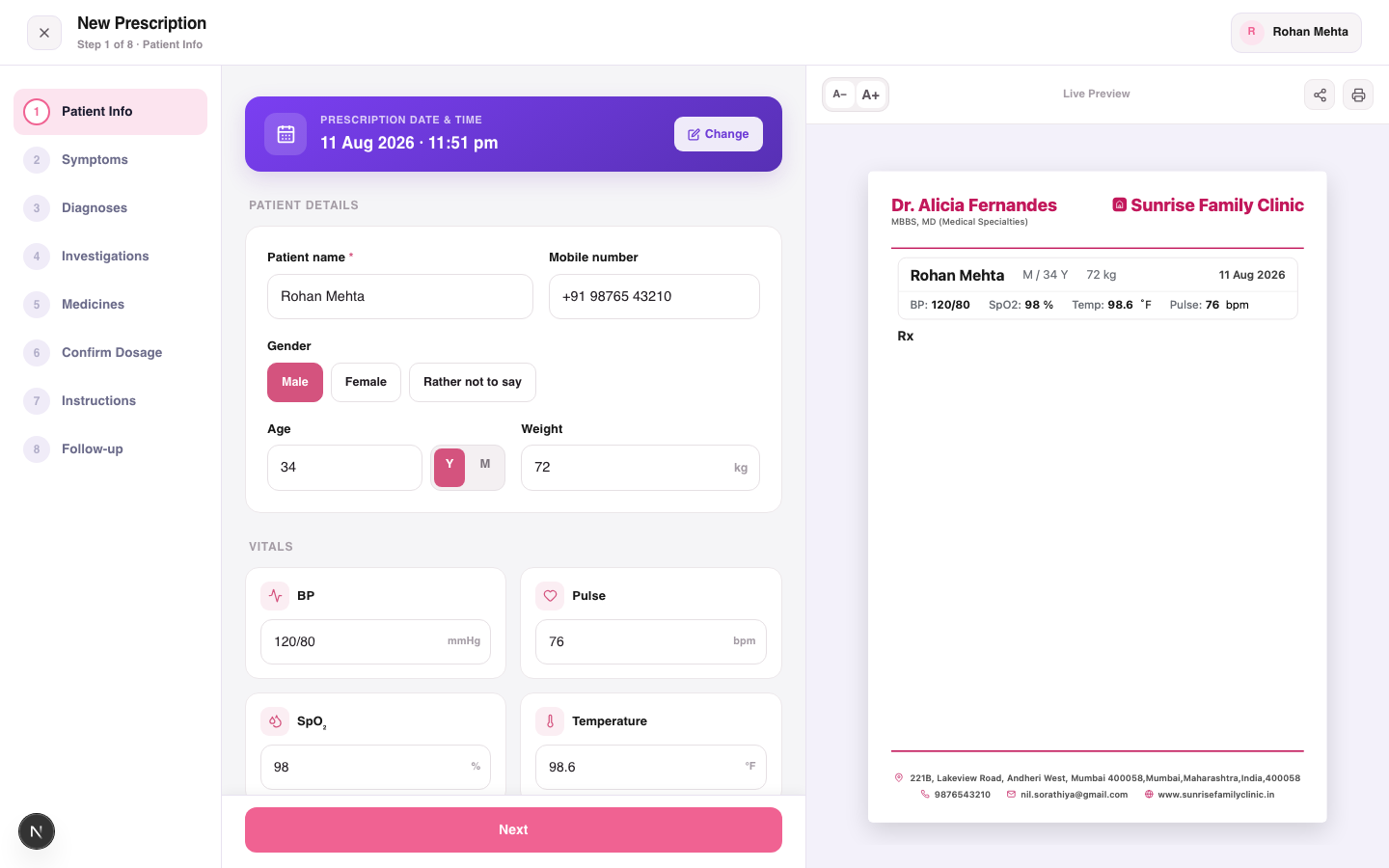
Capture patient details and vitals
Your prescription.
Your style.
Create professional prescriptions that match the way you practice. Configure paper size, typography, spacing, header, footer and doctor signature.
Everything a doctor needs
From patient intake to printed prescription — RxSathi handles the full workflow so you can focus on your patients.
Patient management
Record patient name, age, weight, vitals (BP, pulse, SpO₂, temperature) and visit history in one place.
Saved medicines library
Build a personal library of medicines with dose, frequency, quantity and meal timing. Reuse in one tap.
Print & share
Preview, print or share prescriptions as PDF via WhatsApp. Custom paper size, fonts, header/footer spacing and doctor signature.
Symptoms & diagnoses
Select from a saved library of symptoms, diagnoses and investigations — or type freely. Build your personal medical vocabulary.
Cloud backup & sync
All your data is securely backed up to the cloud. Sign in and access your prescriptions from any device. Silver & Gold plans.
Multi-language support
Print prescriptions in English, Hindi or Gujarati. Set your preferred language once and every prescription follows.
Know exactly who is due back today.
When you write a prescription you set the return date. RxSathi collects every patient due that day into one list — so your front desk can call, confirm the appointment and fill the day's schedule before it starts.
What clinicians are saying
“Writing a prescription used to take me a few minutes per patient. With my saved medicines library, I can now do it in seconds without compromising on detail.”

“Amazing. Their update regularly as per our requirement. Short out the issue. Listen to our query. We use this application for a long time. Smooth design. I think every hospital must use this application. Highly recommended.”

“I've been using daily in my clinic, and it has significantly reduced the time I spend writing prescriptions. The PDF prescriptions look professional, and the medicine library is very helpful. The recent updates have made the app faster and easier to use. Highly recommended for practicing doctors.”
“An excllent app for doctors to create prescriptions digitally with ease. Selecting symptoms, diagnosis, medicines, investigations, and follow-up dates is simple and well organized. It saves time, reduces errors, and makes prescription management much more efficient. Highly recommended for daily clinical practice.”
“Managing two clinics used to be a mess of notebooks. RxSathi keeps everything in one place.”
“Simple enough that my front-desk staff picked it up in a day. Support has been excellent.”
Frequently asked questions
A few helpful answers before you get started.
Yes. Start with the Free plan and compare Advanced and Elite as your needs change. Visit Pricing for current prices, features and usage limits.
RxSathi is available on Android, iOS and the web. Download the mobile app or open the web platform in your browser.
Yes. Preview your prescription, then print it or use the available PDF and sharing options. Check your paper size and printer settings before printing.
Yes, on plans that include receptionist access. Invite your front-desk staff to capture patient details and vitals and add patients to your queue using their own login.
Choose a template and adjust the paper size, margins, header and footer in prescription settings. You can also configure the print language, font and signature.
Create a doctor account, complete your profile and clinic setup, then choose New Prescription. The Doctor’s Guide walks you through each step.